- Start with the problem, not the model
- What AI does, and what it’s actually worth
- The feasibility framework
- Interaction model and technology selection
- The harness: orchestration, memory, guardrails, policy
- Production engineering: latency, observability, evaluation
- LLM-as-a-judge
- Cost, model churn, and compliance
- Tools
- Tools vs MCP
- Tool use, internal knowledge, and injection
- Beyond one use case
AI solution design, from first principles
A 12-module learning path through strategy, architecture, evaluation, and security — the arc of a working thread, filled out where it stayed shallow.
Most AI-solution advice arrives framework-shaped: pick a value bucket, fill in a scorecard, ship. The parts that actually determine whether a use case survives contact with production — how you check the output is right, what the harness does between the model and the world, why your judge might be lying to you — tend to stay shallow. This is the version I wanted for myself: twelve modules, each ending with a self-test and a short reading list, no fixed schedule.
1 Start with the problem, not the model
Before choosing a model or an architecture, get specific about who is in pain, what they do today, and whether they’d pay to make it better. Then sketch the handoff: which parts of the workflow the human still owns, and which parts the model takes on. AI rarely replaces a whole workflow — it augments a slice of it, and drawing that slice out is what tells you where to actually build.
Build the smallest interaction that delivers real value — one document type, one decision, one conversation that genuinely helps — and test it with five to ten real users before building anything bigger. The “Wizard of Oz” phase — faking the automation by hand behind the scenes — is underrated: it tells you what people actually need before you’ve written a line of model-facing code.
Capture the baseline before you build. You cannot reconstruct it after launch — the moment the tool exists, behaviour changes and the old numbers are gone. Before you start, ask: how long does the task take today, measured rather than estimated? How often does it happen, and who does it? What’s the current error rate, and how is an error noticed? What does “good” look like to the person doing it now?
Ask whether the output can be checked cheaply. This is the strongest single predictor of whether a use case survives contact with production — stronger than whether the data is unstructured. Code either compiles or it doesn’t. A summary requires reading the source document to confirm. If verifying the output costs as much as doing the task yourself, the tool saves nothing and people learn not to trust it.
Set kill criteria at the start. Agree what result would make you stop — a quality floor, an adoption floor, a cost ceiling — before you’re emotionally or politically invested in the answer. This is easy on day one and nearly impossible six months in, which is why so many internal AI projects run for a year in a state of not-quite-working.
A prompt prototype in a week or two, an MVP in a couple of months, a polished product in a couple of quarters, are reasonable planning defaults — but the variable that actually sets the schedule is how long it takes to build a reliable way of telling whether the output is good. If verification is cheap, an MVP can land in days. If it needs domain-expert review, the evaluation work dominates everything else, and the plan should say so.
Self-test
- Someone brings you an idea in a corridor. What three things do you write down before anyone touches a model? What the task costs today and how that’s measured; how you’d tell the output was wrong; who would use it and how often. Everything else can wait.
- Why is Wizard of Oz worth the few days it costs? It separates “people want this outcome” from “people want this interface”. Most failed AI features got the second one right and the first one wrong.
- You’re told a use case is high value but the output can only be checked by a senior domain expert. What changes? The evaluation work becomes the project. Budget for expert annotation time, expect a slower loop, and consider a narrower slice where checking is cheaper.
Further reading
- What We’ve Learned From a Year of Building with LLMs — field notes from practitioners; the tactical section is the antidote to framework-shaped advice.
- DeepLearning.AI short courses — hour-long video courses, good for getting a concept into your hands rather than your notes.
2 What AI does, and what it’s actually worth
Not every problem needs a model. The litmus test: if you can write the logic as an if/else, don’t use AI — use code. If a human would need to look at it and use judgement, that’s a candidate.
The four buckets of value. Naming which one you’re selling clarifies almost everything downstream — teams that can’t pick one usually haven’t found the value yet.
- Efficiency — automates repetitive cognitive work, reducing time or cost.
- Insight — finds signal in noise a human would miss, improving decisions.
- Personalisation — tailors content or experience at a scale a human couldn’t match.
- Accessibility — makes a complex task possible for someone without the expertise.
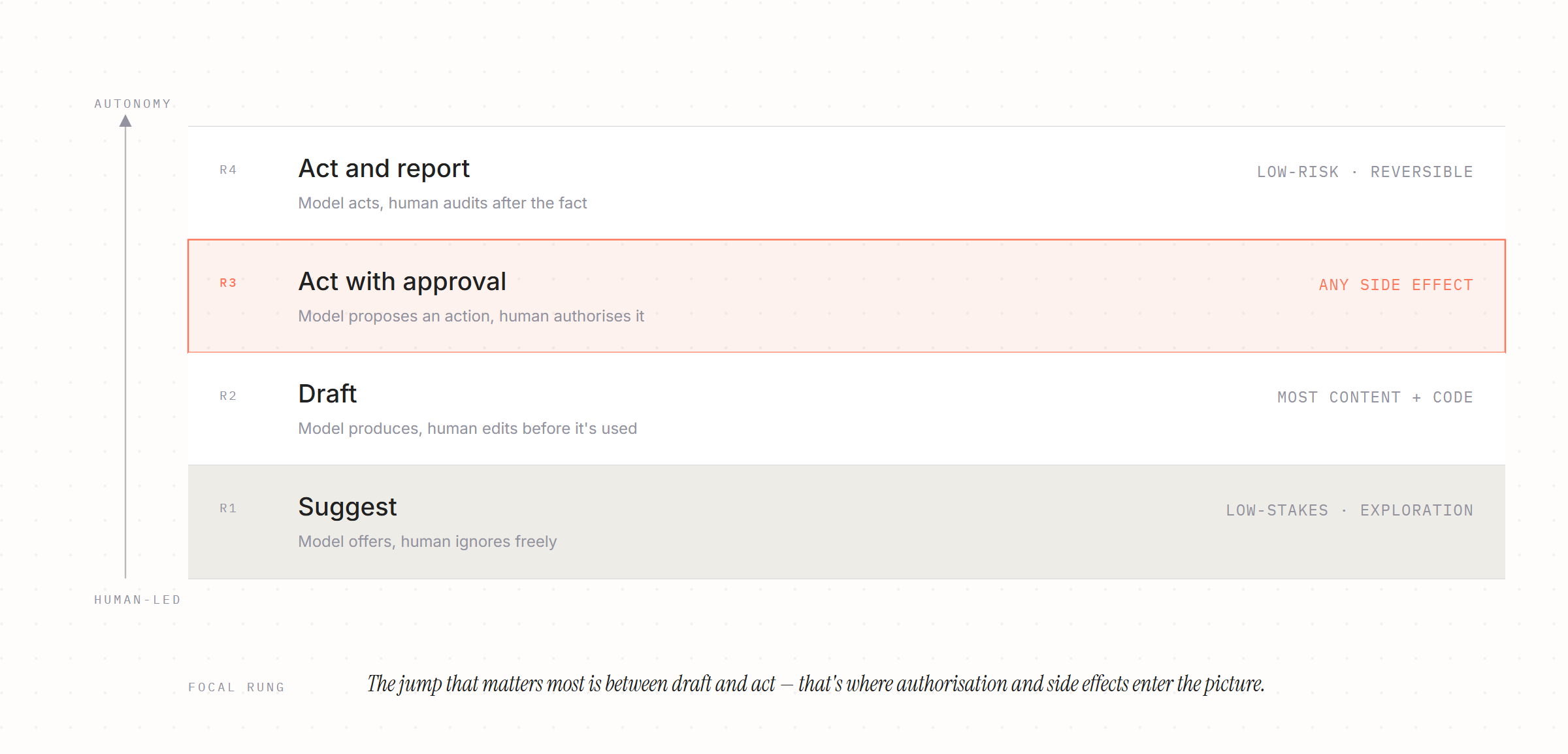
The autonomy spectrum. Where the model sits between suggesting and acting is the decision that actually changes your risk profile.
| Rung | What happens | Best for |
|---|---|---|
| Suggest | Model offers, human ignores freely | Low-stakes ideas, exploration |
| Draft | Model produces, human edits before it’s used | Most content and code work |
| Act with approval | Model proposes an action, human authorises it | Anything with a side effect |
| Act and report | Model acts, human audits after the fact | Low-risk, high-volume, reversible actions |
The jump that matters most is between draft and act — that’s where authorisation and side effects enter the picture, and where the harness (module 5) needs to do real work.
Calculating value honestly. The basic shape — cost of the old way, minus cost of the new way, plus revenue impact — is a fine starting point, but three multipliers decide whether the number survives a finance review:
- Adoption. A good tool used by 8% of the team delivers 8% of the modelled value. This is the most common reason internal business cases fail to land.
- Conversion of freed time. Time saved is money only if the capacity is redeployed to something valued, or a hire is avoided. Otherwise it’s slack — possibly worth having, but not a saving.
- Total run cost. Not just inference tokens — engineering maintenance, evaluation upkeep, prompt repair after model upgrades, on-call. This is the line that turns a positive case negative in year two.
A counterfactual beats a comparison to memory. A staggered rollout, a held-back cohort, or before-and-after instrumentation on the same group gives you a number that survives scrutiny — set it up before launch, because it’s nearly free then and impossible afterwards.
Human review degrades. Reviewers who see mostly-correct output start approving by reflex within weeks, and the better the model gets, the faster this happens. If you’re claiming safety from human review, sample the approved outputs periodically and check the catch rate, not just the throughput.
Self-test
- A stakeholder says the tool saves 400 hours a month. What do you ask next? What proportion of the team uses it, what those hours are now being spent on, and how the 400 was measured. Any one of the three can collapse the number.
- Where on the autonomy spectrum does authorisation become an architectural problem, and why? At “act with approval” and beyond, because the system now takes actions on someone’s behalf and must carry their permissions — not a shared service account’s — and log who authorised what.
- Your copilot has a 95% approval rate from reviewers. Good or bad sign? Unknown until you sample. It’s consistent with a good model and with reviewers who have stopped reading.
Further reading
- Patterns for Building LLM-based Systems & Products — Eugene Yan’s map of the pattern space; the evaluation and guardrail sections are the strongest part.
3 The feasibility framework
Aim for high-frequency, high-impact work — that’s where AI creates the most value per unit of engineering effort. And ask “if this is wrong, how hard is it to undo?” rather than only “how likely is it to be wrong?” — reversibility is what actually determines how much autonomy you can safely grant a system.
A scorecard that resists wishful thinking. A simple 1–5 checklist across problem severity, AI-ability, frequency, data readiness, and risk is a useful starting shape, but three things make it usable rather than decorative: weight it, so frequency and verifiability outweigh novelty and enthusiasm; require evidence per line, since a score without a source is an opinion with a number attached; and set the threshold before scoring, not after seeing the total.
Data readiness, for a retrieval world. Most LLM applications don’t train anything, so “is the data clean enough to train on” is the wrong question. What matters instead: does the knowledge exist in written form at all; who owns it and keeps it current; can it be retrieved with the requester’s permissions intact; how stale is it. Undocumented tribal knowledge is the real blocker, and no amount of data cleaning fixes that.
Three questions the standard framework skips. Verifiability (module 1) deserves a weighted line on any scorecard. Variance tolerance asks whether the business can live with a distribution of outcomes rather than a fixed one — some processes genuinely can’t, no matter how good the prompt is. And build, buy, or wait: if the platform vendor will plausibly ship this in the next couple of quarters, building it now mostly generates maintenance work later.
Think in portfolio, not single case. Does this use case reuse a shared platform layer — auth, guardrails, observability, evaluation — or does it rebuild its own? A mediocre use case on shared infrastructure often beats a strong one built standalone, because the standalone one carries its whole stack as permanent maintenance.
Self-test
- Two proposals both score 24/30. What tells them apart? Which criteria carried the score. High frequency plus cheap verification is a different proposition from high impact plus expert-only review, even at the same total.
- What replaces “do we have clean training data?” for a retrieval-based system? Does the knowledge exist in writing, who keeps it current, can it be retrieved under the requester’s permissions, and how stale is it.
- When is the right answer to a genuinely good use case “don’t build it”? When a vendor already in the estate will ship it shortly, when the output can’t be verified at acceptable cost, or when it would be the fifth standalone stack in the portfolio.
4 Interaction model and technology selection
Not every AI product is a chatbot. Chat suits exploration and complex queries; an embedded action (a single button in an existing tool) suits a narrow, well-defined task; a background process suits high-volume, low-risk work the user never has to watch. Choosing the interaction model is often a bigger lever than choosing the model itself, because internal tools usually win by meeting people inside the workflow they already have open, not by asking them to leave it.
Prompting, RAG, fine-tuning, agents — as answers to different questions. These aren’t four points on the same axis. Each answers a different failure mode:
- Prompting — fastest to build; the model already knows enough, you need to phrase the ask well.
- Retrieval (RAG) — changes what the model knows at inference time. Use it when the model doesn’t have your data.
- Fine-tuning — changes how the model behaves: tone, a consistent house style, domain jargon it keeps getting wrong, or pushing a task down to a smaller, cheaper model. It does not teach the model current facts — anything baked into weights can’t be updated or permissioned per user, and structured output is now handled by constrained decoding, not training.
- Agents (tool use) — for when the AI needs to do something, not just say something, and the steps required can’t be fully enumerated in advance.
If the failure is “it doesn’t know our data”, retrieval fixes it and tuning won’t. If the failure is “it knows the data but writes it the wrong way”, tuning fixes it and retrieval won’t. Knowing which failure you have is the actual skill — worth being able to explain from first principles, cold, in under a minute.
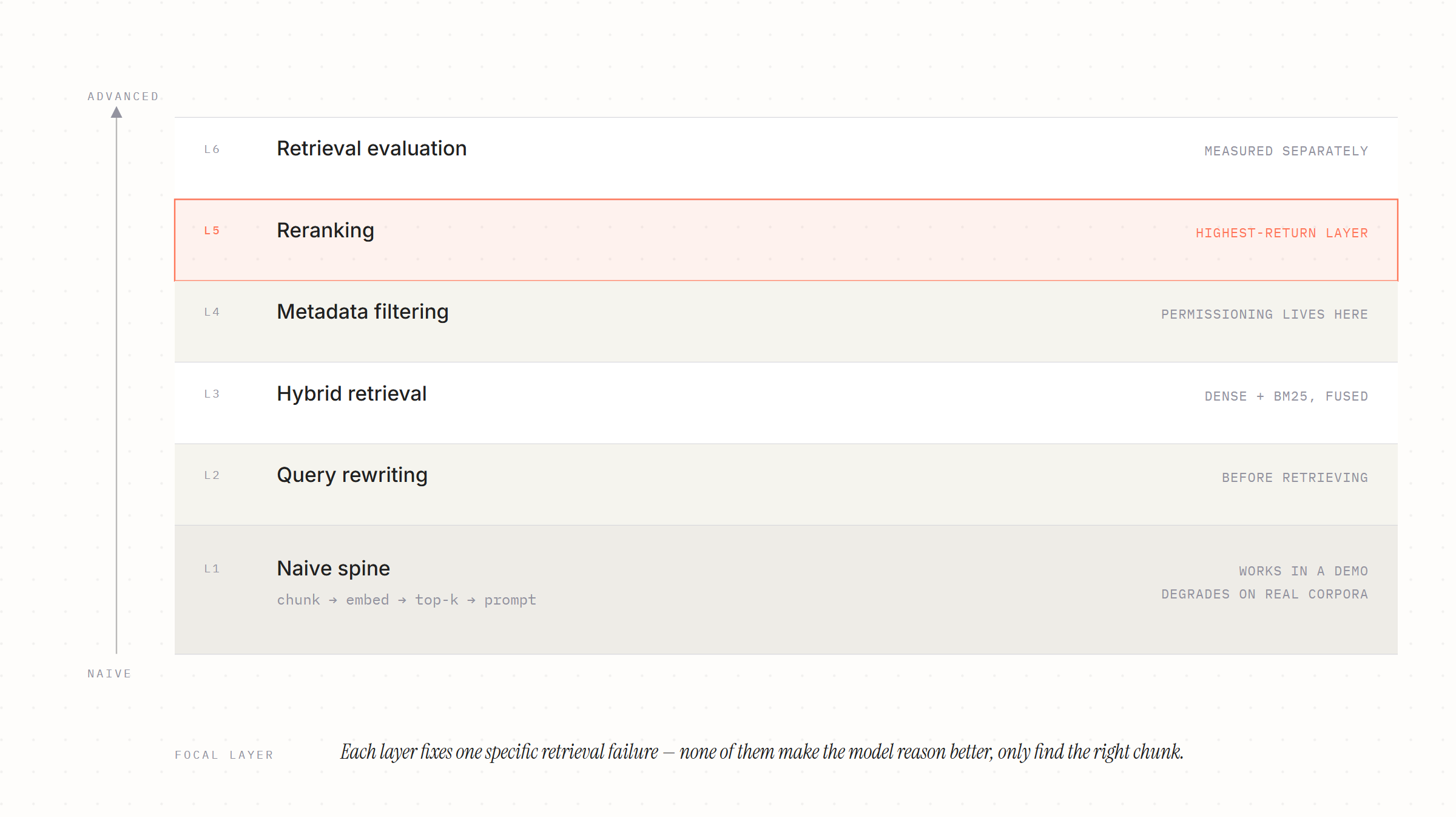
Naive vs advanced retrieval. Naive RAG is the whole spine in one sentence: split documents into fixed-size chunks, embed them, embed the query, return the top-k by similarity, paste into the prompt. It works in a demo and degrades on real corpora. Advanced RAG wraps that spine with layers that each fix a specific failure:
- Query rewriting — the user’s phrasing rarely matches the document’s, so rewrite before retrieving.
- Hybrid retrieval — dense embeddings miss exact identifiers, error codes, product names. Keyword search (BM25) catches what embeddings blur; run both and fuse the results.
- Reranking — a cross-encoder rescores the top 50 down to the top 5. Usually the single highest-return addition you can make.
- Metadata filtering — restrict by tenant, product, version, date before ranking; this is also where permissioning belongs.
- Retrieval evaluation — measured separately from generation (module 6).
Does chunking strategy affect accuracy? Yes — through retrieval recall, not through the model getting worse at reasoning. A bad chunk boundary splits the answer across two chunks, so neither one scores highly enough to be retrieved, and the model answers from nothing. What looks like hallucination is very often a retrieval failure. Fixes: overlap between chunks so a boundary doesn’t sit mid-answer; structural chunking on headings and sections rather than a fixed character count; parent-document retrieval, which indexes small chunks for precision but returns the enclosing section for context; contextual headers that prepend the document and section title to each chunk, so an orphaned paragraph is still identifiable. Measure recall@k on a labelled query set before tuning any of this — otherwise you’re guessing which layer the problem lives in.
How context windows affect long-horizon agent tasks. A large window is a budget, not a solution. Three effects compound as a task runs longer: attention degrades over length, so material buried in a very long context is used less reliably than material at either end; cost and latency scale with input, so a fifty-step agent re-sends and re-pays for its early history fifty times over; and history accumulates noise — failed attempts, stale tool output, abandoned branches — that actively misleads later steps. The mitigations: compaction (periodically summarise history into a compact state and drop the raw turns), externalising state to files or a store the agent re-reads on demand, just-in-time retrieval instead of pre-loading everything, and sub-agents with isolated contexts that report back only conclusions. The framing to hold onto: context is a finite attention budget to be curated at every step, not a container to fill up.
Self-test
- Explain naive versus advanced RAG in under a minute, without listing tools. Naive is chunk, embed, top-k, stuff into the prompt. Advanced wraps that spine with query rewriting, hybrid keyword-plus-dense retrieval, reranking, metadata filtering, and its own evaluation — each layer fixing a specific retrieval failure rather than improving the model.
- Does chunking strategy affect output accuracy? Yes, via retrieval recall. Bad boundaries split an answer so no chunk ranks highly, and the model answers unsupported. Fix with overlap, structural chunking, parent-document retrieval, and contextual headers — and measure recall@k before and after.
- Why doesn’t a million-token window solve long-horizon agent tasks on its own? Attention degrades over long inputs, cost and latency scale with every re-sent step, and accumulated failed attempts mislead later reasoning. You still need compaction, external state, and just-in-time retrieval regardless of window size.
- A stakeholder asks whether you should fine-tune on the support corpus. What’s your answer? Almost certainly not, if the goal is teaching it facts. Facts belong in retrieval, where they can be updated, permissioned, and cited. Fine-tuning changes behaviour, not knowledge, and freezes what it learns into the weights.
Further reading
- Effective context engineering for AI agents — context as a finite attention budget; compaction and just-in-time retrieval for long-horizon work.
- Jason Liu — systematically improving RAG — the best practical writing on treating retrieval as a measurable system rather than a vibe.
- Ragas — retrieval and generation metrics you can wire into a test suite.
5 The harness: orchestration, memory, guardrails, policy
The harness is what turns a model into a system: it routes the request, executes tools, manages state, and enforces business rules the model itself shouldn’t be trusted to enforce. Permissions belong at retrieval time, not at generation time — check the requester’s role against a document’s access tags before anything reaches the context window, not after.
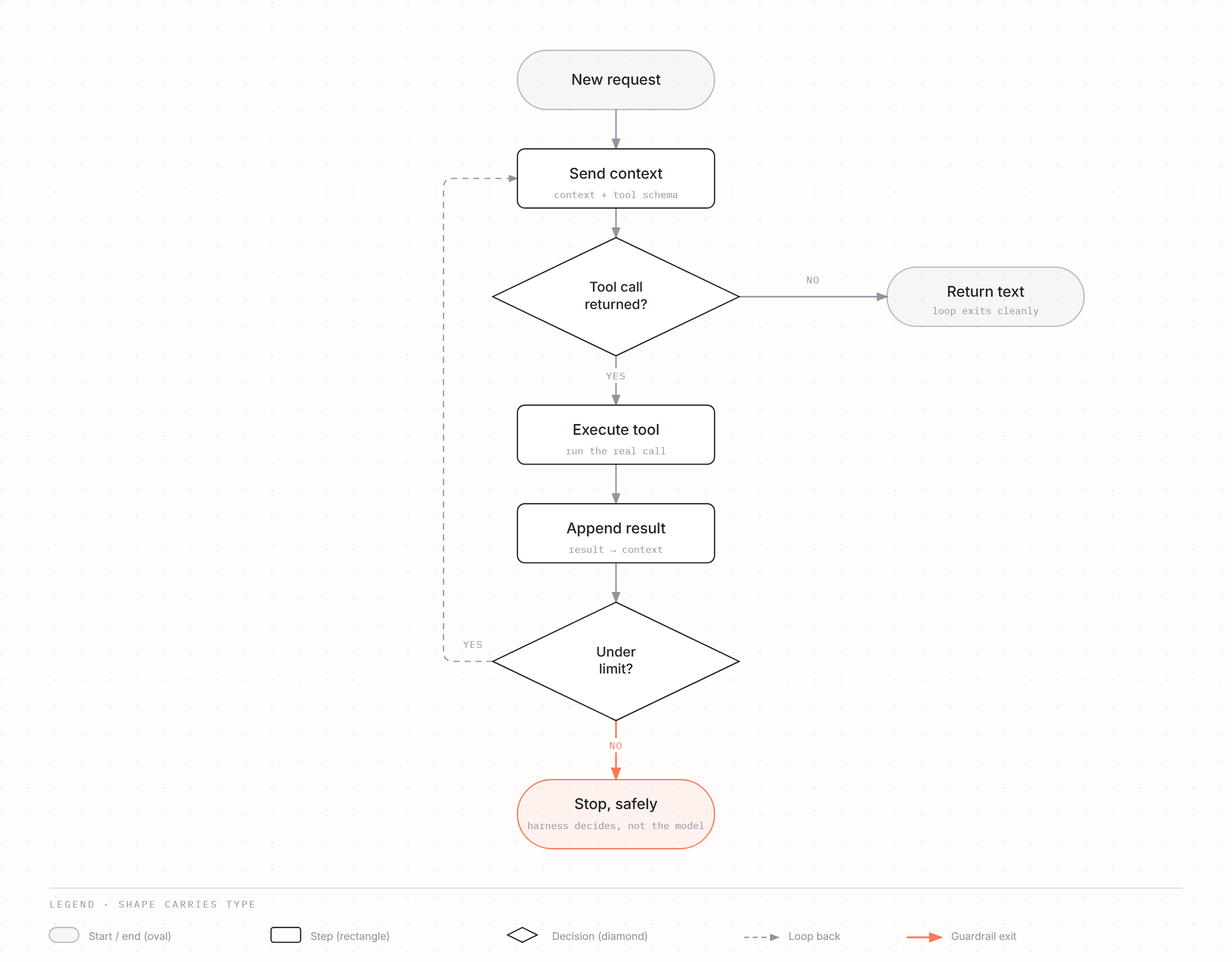
The agent loop, written out plainly. An agent is a model calling tools in a loop until it decides it’s done: send context → model returns either text or a tool call → execute the tool → append the result to context → repeat. That’s the whole mechanism. What makes it production-grade is everything wrapped around the loop:
- Termination — a max step count, a token or cost budget, a wall-clock timeout. Never leave the exit condition entirely to the model’s judgement.
- Budgets — a cost ceiling per task, enforced by the harness.
- Recoverable errors — return “no results for that query, try broader terms” rather than a stack trace. The model can act on the first and not the second.
- Idempotency — retries will happen; side-effecting tools need keys so a retry doesn’t repeat an action.
- Progress detection — a loop repeating the same failing call needs breaking from outside itself.
Workflow first, autonomy only when the path can’t be enumerated. The default should be a deterministic workflow with model calls at the genuinely ambiguous steps — cheaper, faster, testable, and you can reason about what it will do. Reach for a fully autonomous loop only when the sequence of steps genuinely can’t be known in advance. Most systems described as “agents” are workflows with a model call in one or two places, and they’re better systems for it.
Memory, by kind. Short-term (context window) is the current conversation, and needs a summarisation strategy so it doesn’t grow forever. Structured facts — preferences, entitlements, progress, state — belong in a relational store you can query exactly, update, and audit, not a vector database: “this user prefers concise answers” doesn’t need a similarity search, it needs a lookup. Unstructured recall (vector store) is for retrieving material by semantic similarity, not for storing facts with a definite answer — pgvector or a SQLite embedding column covers most internal workloads without adding a new managed dependency.
Guardrails, as one layer among several. Input and output guardrails — PII redaction, jailbreak detection, format validation — are probabilistic classifiers with false negatives, and an attacker only needs one gap. Treat them as one layer of defence in depth, never as the mechanism that alone prevents a serious outcome. That job belongs to architecture: not granting the capability in the first place, scoping the credential narrowly, requiring approval before a consequential action.
Authorisation, not just access control. An agent taking actions is acting on someone’s behalf, and it must not hold rights the requester lacks — the classic confused-deputy problem, where a broadly privileged service account becomes a way for anyone to do anything. Scope credentials down to the requester, keep an audit trail of actor, tool, arguments, and outcome for every call, and require explicit approval for destructive or externally visible actions.
On orchestration frameworks: on a service talking to one provider, a hand-written loop is often under a hundred lines and completely debuggable. Frameworks earn their place for their integrations and community, not for hiding the loop — write one by hand at least once before reaching for a framework, so the choice is made on evidence.
Self-test
- Describe the agent loop in four steps, then name three things that stop it running forever. Send context, model returns text or a tool call, execute and append the result, repeat. Stopped by max steps, a token or cost budget, and a wall-clock timeout — enforced by the harness, not the model.
- When would you not use an agent? Whenever you can enumerate the steps in advance. A deterministic workflow with model calls at the ambiguous points is cheaper, testable, and predictable.
- Where does “this user prefers short answers” belong, and why not in a vector store? A relational row. It’s a structured fact you’ll query exactly, update, and audit — similarity search gives you fuzziness you don’t want for something with a definite answer.
- Your agent uses a service account with broad database rights. What’s the risk, in one sentence? Confused deputy — anyone who can reach the agent inherits the service account’s privileges, so the model’s judgement becomes your access control.
Further reading
- Building effective agents — workflow patterns versus autonomous loops, and when the extra autonomy earns its cost.
- Anthropic cookbook — runnable notebooks, the fastest way to hand-write a tool loop once.
- Anthropic engineering blog — where the tool-design and long-running-harness posts land as they’re published.
6 Production engineering: latency, observability, evaluation
Trace every request with an ID, log token usage and latency against it, and gate deploys on an evaluation score rather than a hunch. Those two habits — traceability and a regression gate — do more for reliability than almost anything else in this module.
Build the eval set from real failures, not imagination. The natural instinct is to sit down and write a hundred good test questions. This is the most common way evaluation efforts stall — questions written from imagination test the failures you can picture, which are rarely the ones you actually have. The order that works: instrument first, so you have real traces to look at; read a few dozen of them properly and write down, in plain language, what went wrong; group those notes into a failure taxonomy — usually five or six recurring modes, plus a long tail you can ignore for now; write evaluators for the modes that are frequent and costly; only then assemble a regression set, built from the real failures you found. Error analysis is the actual skill here; the dataset is a by-product of doing it properly.
Retrieval and generation, evaluated separately. Otherwise every failure looks like a hallucination. Evaluate retrieval on its own first — recall@k and precision against a labelled query set: did the right chunk come back at all? If it didn’t, no prompt change will help. Only once retrieval is sound is it worth asking whether the answer is faithful to what was retrieved. This split is one of the most useful diagnostic habits in RAG work.
Automated scoring, at scale. For very high-volume scoring, reach for a small trained classifier on your own labelled failure mode, or sample the traffic and judge the sample with a model — rather than surface-overlap metrics like BLEU or ROUGE, which need a reference answer you won’t have in production and correlate poorly with quality on open-ended output.
Three stages of evaluation, not one. Offline regression runs against the curated set, gating merges. Canary sends a small share of live traffic to the new version while online metrics are watched. Online monitoring reads proxy signals from real usage — abandonment, retries, how much a user edits the output before shipping it, escalation rate. These implicit signals are far richer than thumbs-down, which is sparse and biased toward the people angry enough to click it.
Treat prompts as code. Versioned in the repository, reviewed in a PR, deployable and revertible independently of the application. A documented rollback path: previous prompt, previous model version, previous retrieval index. A kill switch that degrades to a safe state — a static message, a human queue — rather than failing open. An owner and a runbook for “the model started doing something wrong at 2am”, because this failure mode is silent and gradual rather than a clean 500 error.
Streaming solves seconds; it doesn’t solve minutes. An agent working through fifteen tool calls will take real time, and no amount of token streaming makes that feel like a chat response. That’s a job queue, a progress surface, and a notification when it’s done — a different product shape, decided early rather than retrofitted.
Self-test
- You have a new AI feature and no evals. What’s the first move? Instrument it and read real traces. Write down what actually went wrong, group into failure modes, then build evaluators for the frequent and costly ones — not writing imagined questions.
- Users report the assistant “makes things up”. How do you localise the fault? Evaluate retrieval alone first — recall@k against labelled queries. If the right chunk never came back, it’s a retrieval bug wearing a hallucination costume.
- Why is thumbs-down a weak feedback signal, and what’s better? It’s sparse and biased. Implicit signals — retries, abandonment, how much the user edited the output, escalations — cover far more traffic and correlate better with real quality.
Further reading
- AI Evals for Engineers & PMs — Husain & Shankar — recorded lectures plus assignments; error analysis and judge alignment are the core of it.
- Your AI product needs evals — the short written version of the same argument, free.
- Hugging Face evaluation guidebook — broad, practical, and honest about where each method breaks.
- Langfuse — self-hostable tracing and eval storage; traces are the input to everything above.
- promptfoo — declarative eval and red-team runs you can put in CI.
7 LLM-as-a-judge
Don’t judge what you can execute or match exactly. Running the code, comparing the string, checking against a regex — all beat asking a model, and are cheaper and more reliable. A judge earns its place for qualities that can’t be expressed in code: was the explanation clear, was the tone right, did the reasoning actually follow.
How you actually know a judge is any good. The test that matters is measured agreement with human labels on your own data — not model size or brand. Label a couple of hundred examples yourself, run the judge against them, and report the agreement rate. A cheap model with a tight, binary rubric routinely beats a frontier model given a vague 1–5 scale.
Known failure modes to design around.
- Position bias — in pairwise comparison, judges favour whichever response came first. Run both orders and discard disagreements.
- Verbosity bias — longer answers score higher regardless of quality.
- Self-preference — models rate their own family’s output more favourably; use a judge from a different family than the system under test.
- Scale compression — 1–5 ratings cluster on 4 and 5, so the metric stops moving even as the product changes.
Binary and specific beats composite. “Score 1–5 on accuracy, clarity, and tone” produces a number nobody can act on and nobody can validate. “Did the response cite a retrieved source for every factual claim — yes or no” produces a number you can drive to zero. Aim for one judge per failure mode, each answering one narrow question, rather than a single composite quality score.
The judge needs its own alignment loop. A judge is an AI system you’ve deployed without evaluating unless you close this loop: label examples by hand → run the judge → measure agreement → read the disagreements → sharpen the rubric on the confusions you find → re-measure. Keep a held-out set and re-check whenever you change the judge model, since a provider upgrade silently changes your measuring instrument.
Judges belong offline, or on a sample of live traffic feeding monitoring — never in the request path. Doubling latency and cost to grade an answer the user is already reading is rarely worth it.
Self-test
- How do you know a judge is any good? You measure its agreement with human labels on a held-out set of your own data, and re-measure whenever the judge model changes.
- Why prefer binary criteria to a 1–5 composite? Composites can’t be validated or acted on and they compress toward the top of the scale. One specific yes/no per failure mode gives a number you can actually drive down.
- Name three judge biases and one countermeasure each. Position bias — run both orders. Verbosity bias — score against a rubric that ignores length. Self-preference — use a judge from a different model family than the system under test.
Further reading
- The Recipe Bot workflow — a worked end-to-end example: error analysis, judge building, retrieval testing on one small app.
8 Cost, model churn, and compliance
Managing cost. Model routing — sending easy work to a cheap, fast model and reserving the expensive one for genuinely hard reasoning — is the highest-leverage cost lever available. Prompt caching at the provider level, for a long system prompt, tool schema, or retrieved corpus that’s re-sent on every call, is usually the single largest saving for anything running an agent loop, since those loops re-send a growing history at every step. Response caching (serving an identical answer to an identical question) helps too, but only where questions repeat verbatim — narrower than it sounds outside FAQ-style traffic.
Model churn. Keep provider calls behind your own interface so a provider switch is a configuration change rather than a rewrite — but abstract the transport, not the capabilities. A wrapper that reduces every provider to a lowest common denominator costs you prompt caching, structured outputs, native tool-use semantics, and extended thinking — the very features that make the expensive model worth its price. Re-run the regression suite every time a model version changes; assuming performance holds across an update is how quality regressions ship unnoticed.
Data privacy and residency. API access at the major providers excludes your traffic from model training by default — this is the norm for programmatic and enterprise access, not something you have to pay extra to unlock; consumer chat products are the exception. Hosting through a managed cloud service (for EU data residency, for example) means prompts often aren’t shared with the model vendor at all. The questions actually worth asking a provider: what’s the retention window and can it be set to zero; where is inference performed; who are the sub-processors; what’s logged and for how long. PII redaction before data ever leaves your own boundary is still worth doing regardless of the provider’s policy.
Total cost of ownership, beyond tokens. Engineering time maintaining prompts, tools, and retrieval as source systems change underneath them. Evaluation maintenance — datasets rot as the product changes and need ongoing curation. Forced migrations — models get deprecated on the provider’s calendar, not yours, and a regression suite is what makes that migration survivable rather than terrifying. Human annotation time, which is the recurring cost people forget to budget for entirely.
Knowledge lifecycle. Retrieval corpora aren’t static. Staleness is a top quality killer in operational contexts — an accurate-sounding answer from a runbook that was superseded eight months ago is worse than no answer, because it carries the system’s authority. You need named owners for source content, a freshness signal exposed to both the model and the user, deletion that propagates through to the index, and a periodic audit of what’s actually being retrieved in practice.
The last mile, and active learning. An answer the user still has to act on manually is a “nice to have”; connecting the model to the action itself — a button, not just a summary — is usually what turns a chatbot into something people rely on. Feedback loops matter: capture thumbs-down (and better, the implicit signals from module 6) into a running “hard examples” set, and route low-confidence cases to a human rather than guessing — that captures training-quality data while keeping the user’s experience intact.
Self-test
- Someone asks whether using a commercial model means the vendor trains on company data. What do you say? Not by default for API and managed cloud access — those exclude traffic from training. The real questions are retention window, inference region, sub-processors and logging, and they belong in the contract.
- Your agent’s cost per task is triple the estimate. What do you check first? Whether the growing context is being re-sent uncached at every step. Prompt caching plus compaction usually beats swapping models.
- Why is a model deprecation notice an operational event rather than an email to file away? It’s a forced migration on someone else’s schedule. Without a regression suite you can’t tell whether the replacement is better or worse until users find out for you.
9 Tools
Retrieval gives the model knowledge; tools give it hands. Tools close three real gaps: real-time data the model’s training never saw, action beyond generating text — sending an email, updating a record, triggering an event — and accuracy, by forcing the model to use a calculator or a database instead of guessing.
The mechanism. The model outputs a structured request for a specific function and its arguments; your code intercepts that, runs the real call, and returns the result back into the conversation for the model to use in its next output. That loop needs a way out that doesn’t depend on the model — a step cap, a token or cost budget, a timeout, and detection for repeated identical calls. A model stuck retrying a failing tool will otherwise burn budget until something else stops it.
What actually determines whether the right tool gets picked.
- Descriptions are prompts. Write them for the model, and state when not to use the tool as well as when to. Most over-triggering is a description problem, not a reasoning problem.
- Fewer, better-scoped tools. Selection accuracy degrades as the tool count grows and scopes overlap — two tools that both plausibly answer a request get chosen between almost at random.
- Hard-to-confuse parameters. Enums over free strings, absolute values over relative ones, explicit units. Every ambiguity in the schema is an error the model will eventually make.
- Errors the model can act on. “No results for ‘X’; try a broader term or check the tenant ID” recovers gracefully. A stack trace does not.
- Results cost context. Schemas and tool outputs consume the same attention budget as everything else — paginate, truncate, and return only the fields needed.
- Side effects need ceremony. Confirmation for destructive actions, idempotency keys for retries, an audit record for every call.
When to introduce tools. When “chat” stops being enough: the user needs real-time information (“is this in stock?”), wants the AI to actually perform a task, the task involves strict math or formatting the model is unreliable at, or you need to bridge two different systems on the user’s behalf. The underlying reason to introduce them is grounding — forcing the model to check real data rather than generate a plausible-sounding guess.
Self-test
- Your agent calls the search tool when it should answer from context. Where do you look first? The tool description — specifically whether it says when not to use it — and whether another tool overlaps its scope. Not the system prompt’s tone.
- Why does adding a twelfth tool sometimes make an agent worse? Selection accuracy falls as tools multiply and scopes overlap, and every schema consumes context budget before the task even starts.
- What does a well-designed tool return when it fails, and why does the shape matter? A short natural-language error with a suggested next action. The model can recover from that; it can’t do anything useful with an exception trace.
10 Tools vs MCP
Tools are the verb — the specific action the model can take. MCP is the cable — an open standard for how a model discovers and connects to tools and data sources without custom integration code for each one. MCP uses tool calling underneath; it doesn’t replace it, it standardises how the tools get exposed and discovered.
What connecting to a server does and doesn’t remove. Connecting is genuinely easy — point at a server and the tools appear. What persists regardless: you still choose which tools to expose, still write the descriptions that determine whether they’re used correctly, and now also manage a surface that can grow past the point where a model selects well. A server exposing forty tools makes an agent worse, not better, for exactly the reasons in module 9.
Trust and supply chain. Tool names and descriptions from someone else’s server enter your model’s context as instructions — a poisoned description functions as a prompt injection with distribution built in. A server you don’t control can also change its behaviour after you’ve approved it, silently. Pin versions, review what you connect to, prefer servers you host yourself for anything touching production data, and treat dynamic tool discovery as something to constrain rather than something to enjoy unmonitored.
When to build a server rather than an internal tool. Build an MCP server when more than one client needs the same capability — your app, plus a coding agent, plus a desktop client. For a single application talking to its own database, an in-process tool is less code and one fewer thing to secure. Authorisation belongs at the server, never at the client, because you don’t control which client will eventually connect.
Self-test
- Someone says MCP means you no longer have to design tools. Correct them in two sentences. MCP standardises how tools are exposed and discovered; the tools still exist and still need good scoping and descriptions. It moves the integration work, not the design work.
- What’s the security argument against casually adding third-party servers? Their tool descriptions enter your model’s context as instructions, and their behaviour can change after you’ve approved them. It’s a supply-chain and injection surface in one.
Further reading
- Model Context Protocol — the spec. Read the transport and authorisation sections properly, not just the overview.
- OWASP GenAI resources — includes specific guides on secure MCP server development and on using third-party servers safely.
11 Tool use, internal knowledge, and injection
There’s no separate deliberation step where the model consults a mental list of tools and picks one. Tool definitions sit in the context window alongside everything else, and a tool call is sampled as output the same way any other text is. The practical levers that shape selection are therefore about what’s in that context: description quality and scope, how many tools are present, worked examples, and forcing or forbidding tool use explicitly through the API rather than only asking nicely in the system prompt.
Decide the grounding policy on purpose. Whether the model may answer from its own general knowledge at all — rather than only from retrieved, citable sources — is a product decision, not a default. In an operations context the usual answer is no: cite a retrieved source, or say you don’t know. That policy needs enforcing, not just stating — check that claims are supported by what was retrieved, and measure how often the system answers without support. A system that reliably says “not found, routing to a human” earns more trust over time than one that’s usually right but occasionally confident and wrong.
Prompt injection. Jailbreaking is a user trying to talk the model out of its own rules directly. Indirect prompt injection is a different and larger problem: instructions arriving inside content the model processes as data — a retrieved document, a ticket comment, a web page, a tool result — and being followed as though they came from the operator. The model can’t reliably tell data from instructions; that’s not a bug awaiting a patch, it’s a property of how these systems work today.
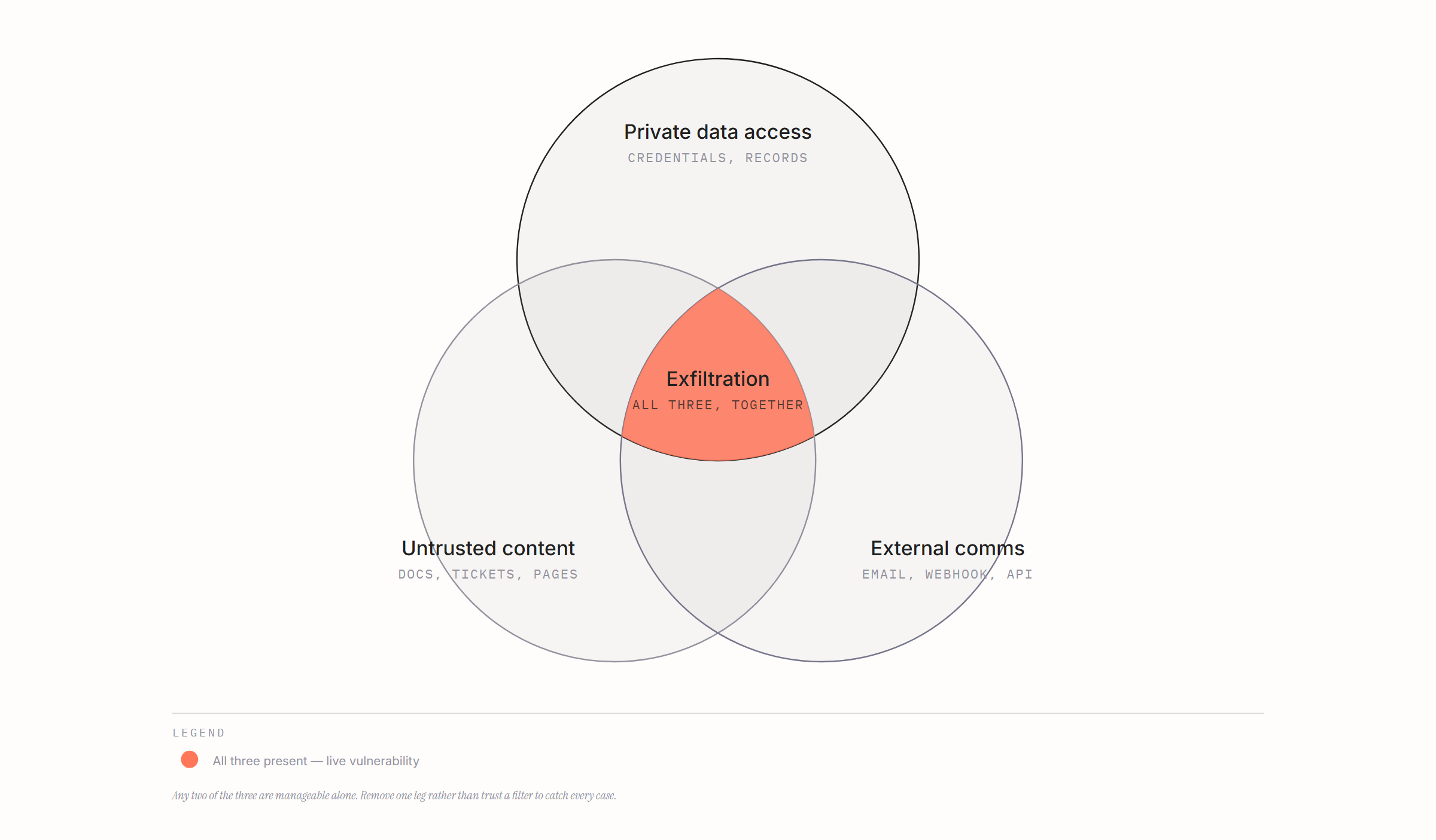
The lethal trifecta. An agent with access to private data, exposure to untrusted content, and a way to communicate externally can be induced to exfiltrate that data. Any two of the three are manageable on their own; all three together is a live vulnerability no matter how good the filters are. The fix is architectural, not a better prompt — remove one leg of the trifecta, sandbox the agent, require human approval before any external communication, and scope credentials narrowly. Design on the assumption that the model will be fooled sometimes, so that when it is, nothing important breaks.
Self-test
- Explain the difference between jailbreaking and prompt injection. Jailbreaking is a user talking the model out of its own rules. Prompt injection is a third party’s instructions arriving inside content the model processes — a document, a ticket, a tool result — and being followed as if they came from the operator.
- What is the lethal trifecta, and why does it matter more than a guardrail? Private data access, untrusted content, and an external communication channel. Together they permit exfiltration by injection, and no probabilistic filter closes it fully — you remove one leg or you accept the risk.
- Your triage agent reads customer tickets and can query internal systems and send email. Which leg do you remove? The outbound channel — draft for human approval rather than sending directly. Tickets are untrusted content by definition, and the internal access is the whole point of the system.
Further reading
- The lethal trifecta for AI agents — the clearest statement of the problem, and where the term comes from.
- Prompt injection, ongoing — years of worked examples of real systems being broken; better than any taxonomy for building intuition.
- Design Patterns for Securing LLM Agents against Prompt Injections — the architectural mitigations, stated properly, with their limits.
- Testing the lethal trifecta with promptfoo — turn the theory into a red-team run against your own agent.
- garak — LLM vulnerability scanner; a fast way to see failure modes on something you’ve built.
- PyRIT — red-teaming framework for automating adversarial probes.
12 Beyond one use case
Portfolio, not project. Once there’s more than one use case, the questions change shape: how ideas enter and get prioritised, what a shared platform layer provides so nobody rebuilds auth and observability from scratch, how reuse gets measured, and how something gets retired when it’s no longer earning its keep. A function running five standalone stacks carries five maintenance burdens and none of the compounding advantage a shared layer would give it.
Adoption is the whole game, in the end. Sound build practice can still produce a tool nobody uses. Adoption tends to come from placement inside the existing workflow, defaults that don’t require a decision, visible reliability over time, and someone whose role explicitly includes enablement — not from a rollout email. Treat it as a designed part of the system, not an afterthought once the build is done.
The governance vocabulary worth having ready.
- EU AI Act — risk-tiered obligations, with transparency, logging, and human-oversight requirements attached to higher-risk tiers. Most internal productivity tooling lands in the low-risk tier, but the classification is a decision someone has to make and record deliberately, not an assumption.
- ISO/IEC 42001 — an AI management system standard; the certifiable process wrapper, analogous to 27001 for security.
- NIST AI RMF — a voluntary risk framing (govern, map, measure, manage) that’s useful for structuring a conversation even where it isn’t formally required.
- OWASP Top 10 for LLM Applications (2026) — the security vocabulary for LLM applications generally. The current edition draws partly from real incident data rather than practitioner voting alone, with prompt injection and sensitive information disclosure still at the top and excessive agency climbing.
- OWASP Top 10 for Agentic Applications (ASI01–ASI10) — the agent-specific companion list, covering planning, tool use, identity, memory poisoning, inter-agent communication, and cascading failure. This is the one to read for anything with a loop in it.
The idea running through the current OWASP editions is worth carrying into any design review: stop trying to build a model that can’t be fooled, and build the system so that when it is fooled, nothing important breaks.
Self-test
- What’s the difference between what ISO 42001, the EU AI Act, and the OWASP lists each give you? 42001 is a management system you can certify against. The AI Act is law with tiered obligations. The OWASP lists are a security risk vocabulary, not compliance. You need all three registers for different rooms.
- Your best-engineered tool has 10% adoption. Where’s the failure likely to be? Almost certainly placement and defaults, not quality. It sits outside the workflow, or it asks people to choose to use it, or one early bad experience set the trust level.
Further reading
- OWASP Top 10 for LLM Applications 2026 — current edition, released this month. Read the changes from the previous list, not just the list.
- OWASP Top 10 for Agentic Applications 2026 — ASI01–ASI10; the one that maps onto anything with an agent loop.
- EU AI Act explorer — article-level browsing; useful for checking an obligation rather than reading commentary about it.
- NIST AI Risk Management Framework — govern / map / measure / manage, a workable structure for a risk conversation.
- ISO/IEC 42001 — the management-system standard itself; know what it certifies before it’s proposed to you.
Security and governance content moves fastest — worth re-checking modules 8, 11, and 12 before relying on them in a meeting.